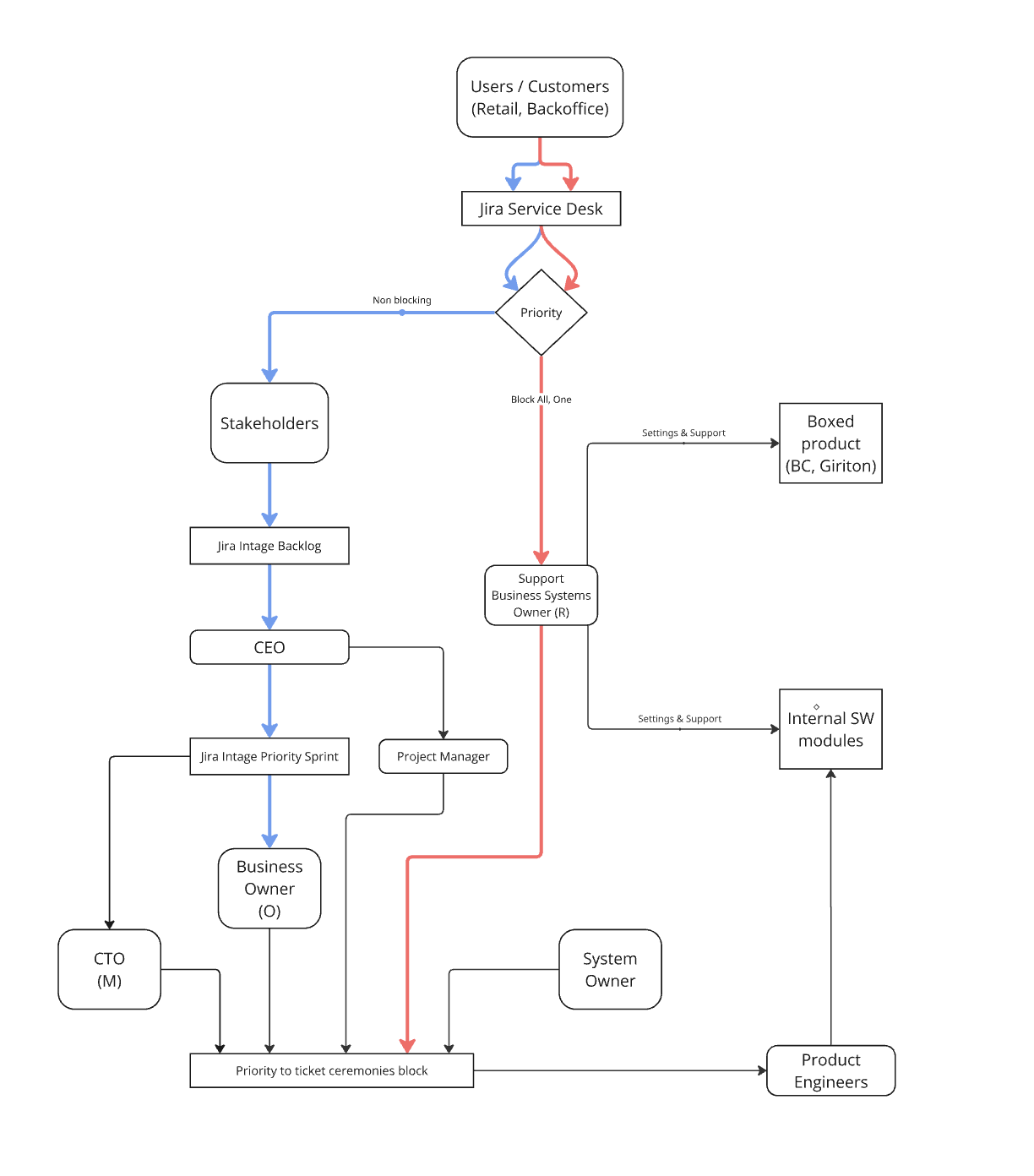
Non-blocking
Use the normal prioritization path
The issue is important, but it does not stop work right now. Keep deep work protected and move the topic through the normal backlog.
-
1
Create the issue in Jira Service Desk.
-
2
Assign an owner and mark it non-blocking.
-
3
Move it into the intake backlog.
-
4
Review priority in Business Prioritization and Weekly Delivery Planning.
-
5
Create a delivery ticket once it is accepted.
Escalation note
The CEO joins only if the priority change has a company-level impact.
owner
priority
delivery ticket
Blocking
Use the support path now
The issue stops users, operations, or a business-critical process. Restore service first; plan the permanent fix later.
-
1
Create the issue in Jira Service Desk.
-
2
Business Systems Administrator or the relevant support owner takes first response.
-
3
Stabilize the service as quickly as possible.
-
4
Escalate to System Owner or CTO only for a decision or technical change.
-
5
Create a follow-up Jira ticket for the permanent fix.
Purchased product
Vendor or product support
Internal SW module
Product Engineer
Infrastructure / identity
IT Operations Owner
Who helps first
service restored
incident owner
follow-up ticket